




Zooming the New PlasmidMap
The New PlasmidMap can be zoomed in and out in the radial direction.
- Hold down the right mouse button and drag outward or inward from the center.
- Dragging away from the center zooms in; dragging toward the center zooms out.
- When zoomed out, any Ring whose radius becomes smaller than a certain threshold is hidden.
Operating the Base Sequence Lane
Handle for specifying the selected range of the base sequence lane
The circular plasmid map has a handle that extends radially from the center. Dragging this handle around the circumference of the plasmid map changes the region displayed in the base sequence lane.
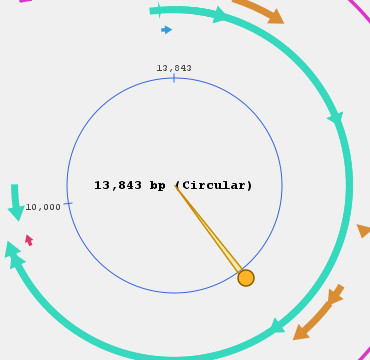
Showing/hiding the sector handle
To toggle the sector handle's visibility, use the Hide sector/Show sector toggle button.
Changing how bases are displayed in the base sequence lane
The bases shown in the base sequence lane can be displayed using one of 4 display modes.
- Color block: displays each base as one of 4 colored blocks.

- Colored text: displays each base as a colored base letter (A, C, G, T).

- Colored background: displays each base with both a colored block and a base letter.

- Fragment background: displays each base letter in black, with each block's background colored according to the fragment it belongs to (assigned automatically per fragment).

Switching the display mode
Choose it from the Sequence display pull-down menu above the Construct Preview.