Converts multiple GenBank files divided into many contigs into one continuous single GenBank format base sequence file.
By using a single base sequence in this way, comparative genomic functions (DotPlot, Venn Diagram, Global Genome Rearrangement Map, Local Genome Rearrangement Map, Gene Cluster Alignment, Core Genome Analysis, Mutation Search, etc.) become easier to use.
Operation
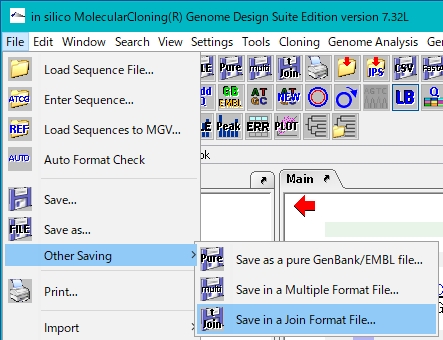
Select File-> Other Saving-> Save in Join Format from the menu.
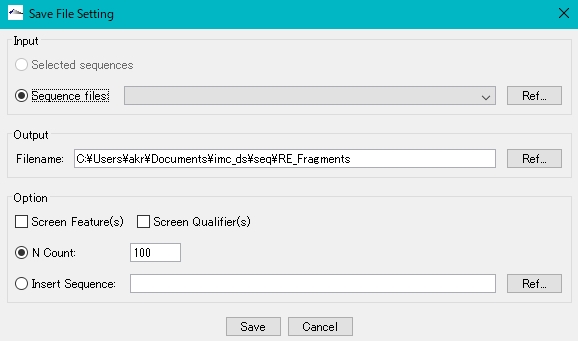
The Save File Setting dialog is displayed.
In the Input field, turn on Sequence File.
Click Ref ... on the right and specify the gbk file you want to edit.
Specify the output destination file name with full path in the Output field.
(You can also click Ref ... and set from the file selection dialog.)
In the Option field, turn on N Count.
The numerical value should be about 100 to 1000
When you click Save, all contigs will be inserted as one GenBank Format File with N bases of the number specified above inserted between them.