

Dongle driver for macOS 10.14, 15 has been released
Dongle drivers for macOS10.14 Mojave and macOS10.15 Catalina have been released.
You can download it from here.
- Details
- Category: Special Notices
-
Also available:

- Hits: 158027
YD0013: SHK(Dongle) not lit in MacOS 10.14 or 10.15
When the dongle LED does not light up on MacOS 10.14 or 10.15, you may be able to solve it by the following operations.
- Open the system settings.
- Click Security & Privacy.
- If you see the message "System software form developer" SFNT Germany GmbH "was blocked from loading", click Allow.
If you do this, you must unlock it.
- Details
- Category: Trouble Shooting
-
Also available:
- Hits: 3039
IMC YD1001 New Dongle LDK is not recognized on MacOS
Phenomenon:
- New dongle LDK is not recognized, License Setting Dialog is displayed, and IMC cannot be started.
Target IMC Version:
- IMC Version 8.35
Occurrence OS:
- macOS
Cause:
- Files required for IMC Install have not been copied to the system area.
- The file user.properties in the IMC Install Directory does not have read/write permissions.
Solutions:
- Copy hasp_darwin_31281.dylib in Mac/Library of IMC Install USB to /var/hasplm. Copying requires administrator privileges.
- Give read and write permissions to the user.properties file located in Applications/imc/bin.
- Right-click on user.propeties in Finder and select "Get Info".
- Change the three permissions in "Sharing & Permissions" at the bottom of the info dialog to read/write. to change
- Unlock the bottom.
- Details
- Category: License Activation Methods
-
Also available:
- Hits: 3408
about macOS 11 Big Sur
Although macOS 11 Big Sur has been released, the following problems have been reported regarding our products when the version is upgraded to the OS.
1. The dongle does not work properly. The Corresponding Dongle Driver has not released from the maker yet.
The workaround is either of the following.
- Revert to macOS 10.
- Switch from dongle license to activation license (free of charge). Please contact us.
- Details
- Category: Special Notices
-
Also available:
- Hits: 159296
IMC B2K1 Register CDS Candidate from Frame Lane
- CDS candidates can be registered as new features from the stop lane stop absence region of the frame lane.
- This is not a CDS prediction function. The GT-AG rule is ignored.
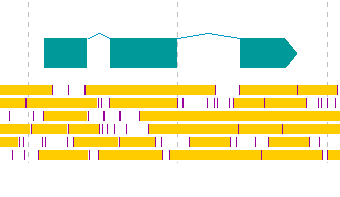
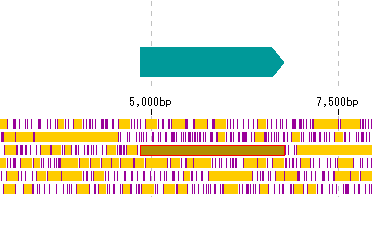
Operation
- Details
- Category: Feature Lane
-
Also available:
- Hits: 6640
YD0018 New Feature Registration Bug from Frame Lane
Phenomenon
In Frame Lane, if you select a region where the stop codon does not appear and register that region as a new feature by right-clicking the mouse, that region will be complemented in the Description Window even though it is in Forward Strand.However, it occurs in the case of new registration from the 3rd frame of Forward Strand. Registration from the 1st and 2nd frames works normally.
Immediate countermeasures
Uncheck Complement in the Description Window and register.
Counter-measure
Bug fix Version IMC Ver.7.46 has been released (2020/12/09).
- Details
- Category: Trouble Shooting
-
Also available:
- Hits: 3375
YD0017 License is not recognized while the dongle is lit
Phenomenon
- The LED of the dongle is lit, but the license is not recognized, the "License request" dialog is displayed, and IMC cannot be started.
Cause
- Due to the recent Java Version Up, activation may not work properly.
Coping
- Reverts the Java version to the previous version.
- If you cannot change the Java version to the previous version, please contact in silico biology, inc. Temporarily issue a fixed license.
- Details
- Category: Trouble Shooting
-
Also available:
- Hits: 5668
IMC T07A Expand Multiple GenBank File (GBFF) into Taxonomy Tree
Extract the GBFF file consisting of many single GanBank format files into a tree-like directory according to the Taxonomy description of each GenBank file and place it in IMC so that it can be handled easily.
Background
The sequence data of GenBank and RefSeq are compiled into a large compressed file at each release time.
Each entry consists of a header file (*. Gbff) and an array part (* fna). In order to make a single GenBank file, it is necessary to combine these two kinds of files.
GenBank File Expander decompresses these files of GenBank and RefSeq, synthesizes them, and unfolds them as a phylogenetic tree-like directory in an arbitrary place.
If you specify this expanded directory as IMC's root directory, it can be displayed and loaded in IMC's directory tree.
Operation
Click "Tools -> Multiple GenBank File Expander" from the menu.
- Details
- Category: GenBank GBFF Expander
-
Also available:
- Hits: 4934
- IMC S411 Execute OGAB Fragmentation Designer
- IMC O11A Operation of Core Genome Analysis
- IMC O13A Operation of Mutation Search
- IMC B2DA Operations Performed from Selected Area of Feature Lane
- IMC B2DA31 Blast Search by CDS of Selected Area on Feature Lane
- About Dongle Trouble under Java 10 Environment
- IMC W1C Change in Procedure of IMC Auto Installation
Page 3 of 4


